All Star Attributes for HTML5 elements in IE

A
I am a web developer from Navi Mumbai.
Mainly dealt with LAMP stack, now into Django and getting into Laravel and Cloud.
Founder of nerul.in and gaali.in
It is very common to set margin:0 and padding:0 as default to all HTML elements via the star hack.
* { margin:0; padding:0; }
And we get so used to explicitly setting margins and paddings to elements that require them, that we assume no padding & margins at all as default for all elements.
With html5shiv javascript, we can get most HTML5 functionality working in Internet Explorer (6,7,8). And with ie7-js, we can get IE (6,7,8) to behave more-or-less like IE9.
When using HTML5 elements such as header, section, footer, aside, nav, article & figure, the all star hack doesn’t work and hence we need to set them explicitly. (Looks like ie7-js is resetting the margins)
IE6 / IE7 :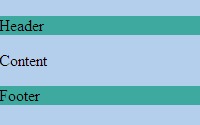
IE8 :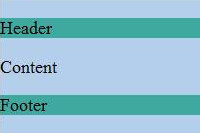
margin:0 isn’t applied in IE 6/7/8. So don’t forget to set it explicitly for HTML5 elements.
header, section, footer, aside, nav, article, figure { display:block; margin:0; padding:0; }